Roots Analytics Onboarding Steps
Welcome to Roots. Let’s make this easy and simple from the start 🪴

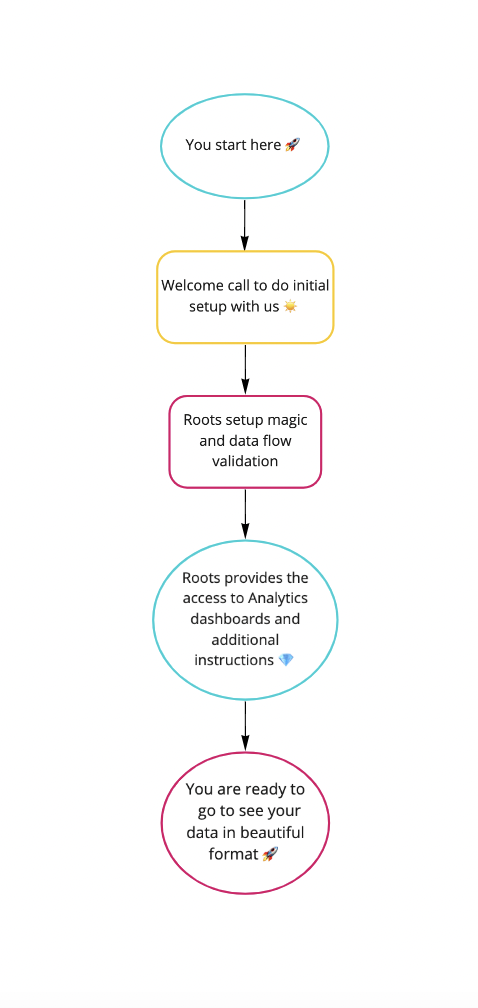
What does onboarding look like?
Roots Analytics has taken time to simplify the onboarding process as much as possible.
We have built a process that should take about 30 minutes of your time during our initial install meeting where we will need your help in connecting our platform to your sites and apps. 🚀
During our initial call, we can schedule the follow up call about a week later.
Once everything is installed, Roots will take 2 – 3 days to complete the setup process.
During the second call, we will show you how to access your data and answer any questions you have. Your primary interface will be the dashboards we deploy on Tableau.
Once you are up and running with our products, everything is designed to run smoothly in the background.
We don’t want you to think about your digital analytics working; we’ll do that for you, so you can focus on making better content and digital campaigns.
Do I need to do anything for the install meeting?
You will need two things in order for the install to be successful:
- Admin access to install code on your website
- Admin access to add records to your DNS
We have worked with many content management systems and DNS platforms; we will be happy to walk you through each of these processes and can verify, during the call, that everything is set up correctly.


What will Roots do to my site?
During the install process, Roots Analytics needs two things to function:
- Install a single JavaScript (JS) function on your global header.
- Add 9 – 10 records to your DNS
This JS function is the Tealium container script. This container script allows Roots to deploy JS onto your site. We use Tealium to manage all the code needed to collect tracking data from your site, and send it to the right location. The foundational deployment includes: Google Tag Manager, Google Analytics 4 scripts, Consent Management HTML and script.
We also support adding most 3rd Party Tags (e.g. Facebook & Twitter) to your site. We recommend deploying 3rd party tags server side, which we support with our 3rd Party Tag Product. Roots will also deploy these tags client side, if you are not ready to switch everything to server side.
The DNS records essentially allow Roots to first send our pixel request – a request for a single pixel image, to which is appended all the data we collect in a URL string – to your servers and then redirect that request to Roots managed servers. By doing this, we can send these requests from your domain, and not from a 3rd party domain. This improves data collection quality and gives us greater flexibility to manage the data before it is sent to servers we don’t manage (e.g. Google Analytics servers).
You will have the option to allow Roots to connect your domain to Google Search Console. This enables us (you and Roots) to pull data from the Google Search Page on the SEO performance of your website. In the short term, this data can be useful for you to try and understand how users are finding your site and optimize your site to perform better for key terms. Roots will also roll out an SEO product in the next few months; beginning the data collection now will only improve the value you could get from SEO data.
What if something doesn’t work, or I have questions?
We have designed all our products to be simple, stable and intuitive. However, Murphy has a habit of crashing the best of intentions. Any issue for one client is an issue for all of our clients; as such, any issue you experience is automatically our top priority. Feel free to reach as at nurture@rootsanalytics.co
“The richest
geniusdataset, like the most fertile soil, when uncultivated, shoots up into the rankest weeds.” 🌱–
David Hume (philosopher)Us (data ninjas)
 Roots Analytics